
Virtualization / Containers · Guide · ~7 min
Kubernetes on Proxmox VE — your own application platform on corporate infrastructure
Alterkom – Technology Team. Proxmox VE as the infrastructure foundation and Kubernetes as the container application layer — without confusing the roles of the two platforms.
Table of contents
Does Kubernetes need a public cloud?
Two layers, two different jobs
Why consider this combination?
How to design a cluster for the enterprise?
High availability: three mechanisms
From first cluster to production platform
Will it work for every organization?
Does Kubernetes need a public cloud?
Kubernetes is often associated with AWS, Azure or Google Cloud. In practice, a container cluster can also run successfully in your own data centre. One interesting foundation for such an environment is Proxmox Virtual Environment (VE) — a virtualization platform built on open-source technologies.
Combining both solutions lets you use existing servers and storage to build an environment where applications can be deployed, updated and scaled in a structured way. That does not mean Proxmox replaces Kubernetes, or the other way around. These technologies solve different problems, which is exactly why they can complement each other.
Two layers, two different jobs
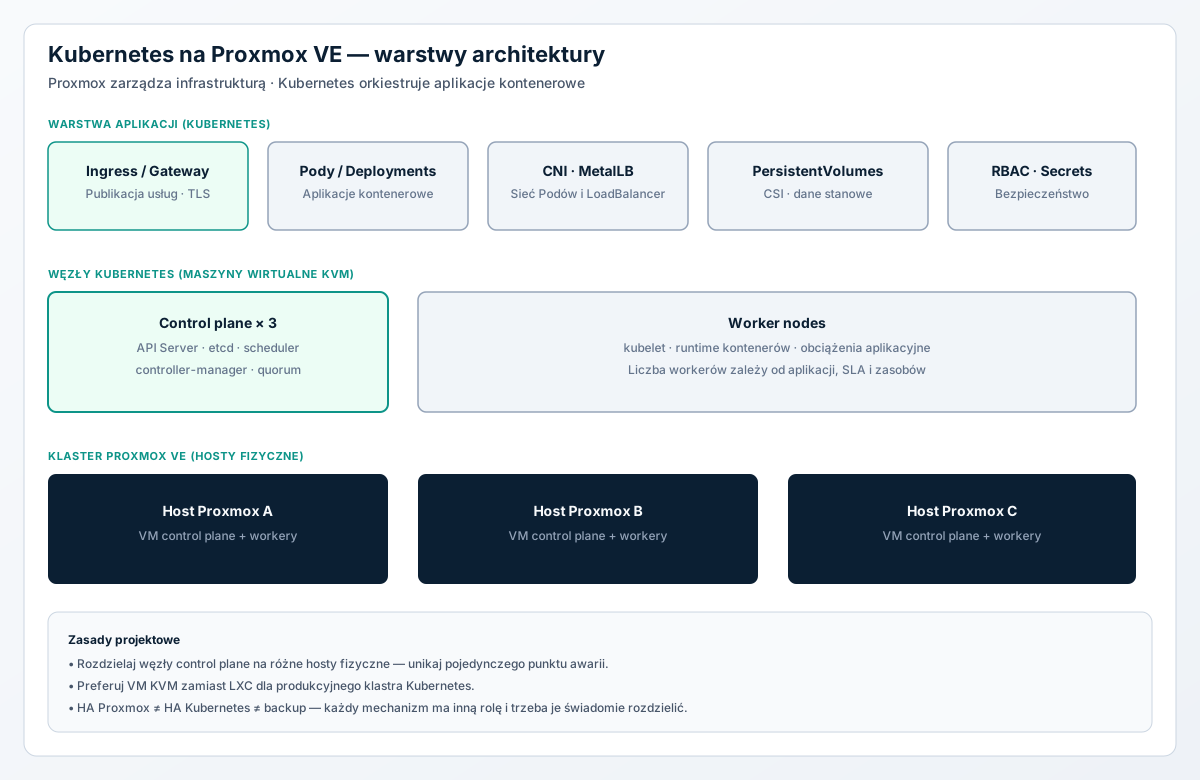
Proxmox VE owns infrastructure resources: physical hosts, virtual machines, memory, networking and data stores. Kubernetes manages applications running in containers: it places them on available nodes, monitors their health and can recreate unhealthy instances.
A typical architecture looks like this:
- Several physical servers form a Proxmox VE cluster.
- Linux virtual machines on those hosts act as Kubernetes nodes.
- Control-plane nodes manage cluster state, while worker nodes run application workloads.
- Applications are published through a properly configured network, Ingress or Gateway API controllers, and a mechanism for exposing IP addresses.
- Persistent application data uses deliberately chosen storage, independent of the lifecycle of a single container.
This separation gives IT teams control over infrastructure, and development teams a repeatable way to deliver applications.
Layer diagram: Proxmox VE and Kubernetes
Why consider this combination?
Using existing servers
Organizations that already run Proxmox do not have to invest immediately in a separate hardware platform for containerization. Kubernetes nodes can run as virtual machines, sharing a resource pool with other systems. You still need performance headroom and should avoid over-committing resources.
Isolation and a simpler node lifecycle
Virtual machines make it easy to use OS templates, Cloud-Init automation and reproducible configurations. It is also easier to separate test, production and development environments. When replacing a node, creating a new VM and joining it to the cluster is usually more predictable than manually repairing a system that has been modified many times.
On-premises and hybrid environments
Local Kubernetes is especially interesting where data control, integration with the enterprise network, low latency to internal systems or predictable use of owned hardware matter. It does not rule out combining the setup with cloud services.
How to design a cluster for the enterprise?
A practical starting point for a high-availability environment is three physical Proxmox hosts, hosting virtual machines for three control-plane nodes and several workers. This is not a universal cluster size: demand depends on applications, user count, SLA requirements and available resources.
Failure domain separation is critical. Three control-plane nodes on a single physical server will not survive that server failing. You also need a stable access point to the Kubernetes API, etcd quorum, and placement of machines across physical hosts. Official Kubernetes documentation describes both a control-plane topology with local etcd and a separate etcd cluster.
Virtual machines or LXC?
Although Proxmox also offers lightweight LXC containers, for a typical production Kubernetes cluster we recommend full KVM virtual machines. Kubernetes and some networking and storage solutions need kernel features, privileges and system interfaces that can be difficult inside LXC. LXC can be interesting in a lab, but saving resources should not come at the cost of operational predictability.
Networking is more than a VM IP address
The network plan should distinguish Proxmox management traffic, traffic between Kubernetes nodes, Pod-to-Pod communication, service publication and storage traffic. Depending on scale, VLANs, dedicated interfaces or logical segmentation are worth using. You also need a CNI choice, such as Cilium or Calico, and a LoadBalancer method in environments without a managed cloud — for example MetalLB — within the constraints of your network.
Before deployment, verify MTU, routing, DNS, firewall rules and Pod/Service address ranges so they do not collide with existing enterprise subnets.
Storage — the key decision for stateful apps
Containers are designed to be replaceable, but databases, repositories and file systems need persistent volumes. In a Proxmox environment one option is Ceph with a suitable CSI driver through which Kubernetes can present volumes to applications. Alternatives include external storage systems and other compatible CSI drivers.
Design a clear boundary between storage used by Proxmox for VM disks and application storage for Kubernetes. Do not assume that having Ceph automatically means ready, correctly configured PersistentVolumes. Separately define backup rules, database consistency and recovery after failure.
High availability: three mechanisms you should not confuse
Different resilience layers operate in this architecture:
- Proxmox HA can restart a virtual machine on another host when cluster and storage requirements are met. It does not replace application-level mechanisms.
- Kubernetes HA maintains the desired number of replicas and places Pods on available workers when the application and cluster are prepared for that.
- Backup and disaster recovery enable recovery of data and configuration after mistakes, data loss or larger outages. Neither HA nor replicas are a substitute for backup.
Too many automatic restart mechanisms across layers can make diagnosis harder. In practice, decide whether a given scenario should recreate the VM via Proxmox or move the application via Kubernetes — and test behaviour on host, VM, worker and storage failure.
Proxmox HA, Kubernetes HA and backup solve different problems. Confusing them creates a false sense of safety.
From first cluster to production platform
A sensible project proceeds in stages:
- Pilot. Create an isolated environment, a few VMs and a small Kubernetes cluster — for example with kubeadm or a K3s distribution.
- Automation. Prepare VM templates, Cloud-Init, infrastructure as code and declarative application configuration.
- Platform services. Configure CNI, DNS, Ingress or Gateway API, TLS certificates, CSI storage, an image registry and secrets management.
- Resilience and security. Failure tests, RBAC access policies, traffic segmentation, updates, image scanning, plus backup of etcd and application data.
- Operations. Monitoring of Proxmox and Kubernetes, log centralization, alerting, an update plan and recovery drills.
Only after completing these stages should the environment be treated as a platform for important business services.
Will Kubernetes on Proxmox work for every organization?
Not always. For a few simple applications on a single server, a set of VMs and Docker Compose may be easier to maintain. Kubernetes delivers the most value when there are many applications, they are deployed regularly, they need automatic scaling or failure resilience, and they share common operational standards.
Skills cost also matters. Kubernetes does not remove the need to manage networking, security and data — it adds its own layer that must be monitored and updated. High availability requires real hardware, network and storage redundancy, not just enough virtual machines.
Summary
Proxmox VE and Kubernetes form an interesting foundation for a modern local application platform. Proxmox provides a flexible virtual environment, while Kubernetes automates container workloads. The best results come not from installing a cluster alone, but from designing its architecture correctly: role separation, networking, durable storage, security and operating procedures.
For organizations building their own portals, API services, automation and AI solutions, this can be a natural step from individual containers to a structured production environment. Start with a small pilot and validate it on real workloads.
Alterkom supports the design and delivery of virtualization infrastructure and application platforms — from architecture analysis through implementation and ongoing operations.
Sources and further reading
[1] Proxmox VE — official administrator guide
[2] Kubernetes — creating a highly available cluster
[3] Kubernetes — installing kubeadm
[4] Kubernetes — creating a cluster with kubeadm
[5] Plural — Kubernetes on Proxmox: A Practical Guide
[6] HorizonIQ — Kubernetes on Proxmox
This text was authored from technical documentation and topic analysis; it is not a translation of the source articles.
Related catalog products
Servers and storage used in virtualization and container-cluster projects — selection depends on scale and SLA requirements.


Related focus areas
Topics linked to designing a local application platform.




Read also
Other materials from the Knowledge section.

Wysoka dostępność serwerów – jak zapewnić ciągłość działania infrastruktury IT?
Klastry HA, redundancja, RPO/RTO i Disaster Recovery — bez mylenia HA z backupem.
Czytaj więcej
Omnissa Horizon czy Citrix? Dwie drogi do nowoczesnego VDI
Porównanie platform VDI, Blast Extreme, HDX i scenariusze wyboru.
Czytaj więcej
Lokalne AI w firmie – jak wdrożyć własną sztuczną inteligencję?
Private AI, lokalne modele LLM, infrastruktura GPU i RAG.
Czytaj więcejDesign a local application platform with Alterkom
We help choose Proxmox and Kubernetes architecture, plan networking and storage, and define the path from pilot to production.
Recommended by Alterkom
Solutions, focus areas and products related to this article — a path into our offer.